
Android tablet app · ASBIS / AROS
Delivery robot interface
Group project, all design deliverables by me · Used Figma & Photoshop
01.Overview
Company
AROS (ASBIS Robotic Solutions) is a division of ASBIS that develops robotic solutions for automating delivery, cleaning, and service tasks. AROS creates autonomous robots, 24/7 robotic kiosks, and robotic actuators, driving innovation in retail, logistics, and industrial robotics.
Project
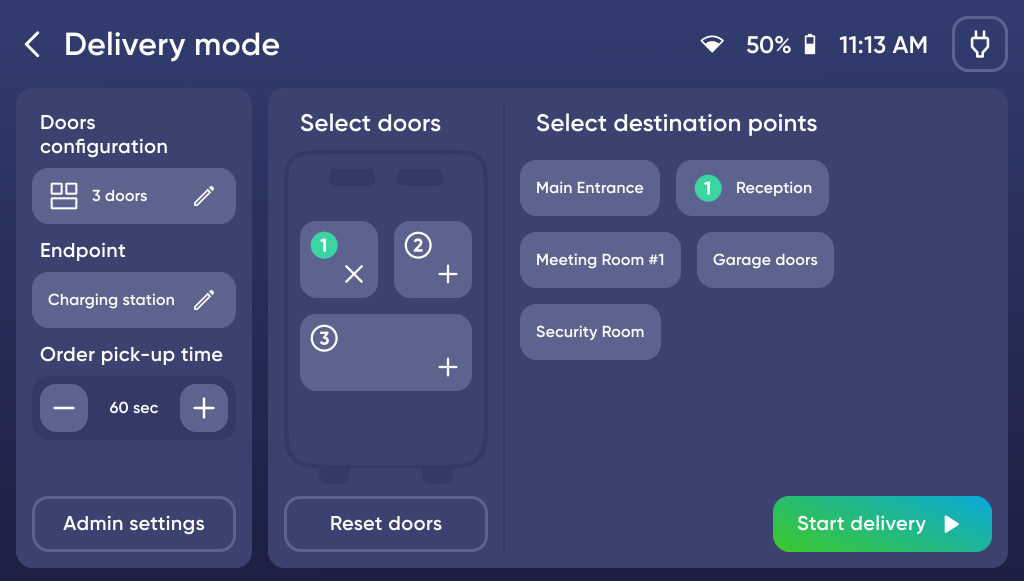
Dev'n'Go is an Android interface for a tablet integrated into a delivery robot. The same application ran on top of hardware from different manufacturers — each with its own capabilities and physical design. It enables control of and interaction with the robot during delivery, and also allows users to create and configure the map, routes, and movement scenarios. Depending on the robot's model and chassis type, robots running this interface are used in a wide range of indoor environments — from restaurants, where they deliver meals, to industrial facilities, where they transport loads of up to 800 kg.
Team
Besides me, the team included:
- Two Android developers
- Two QA engineers
My role
- UI design
- Competitive analysis
- UX research
- Feature concept development
- Team management

Factory delivery robot with Dev'n'Go UI
02.Challenges
The need for a new robot interface
Initially, the delivery robots shipped with preinstalled, manufacturer-provided interfaces. However, they had several critical shortcomings:
-
 The user experience was poorly thought out: the interfaces looked outdated and so confusing that users could not grasp the full range of the robot's functionality.
 - The default applications were slow and unstable — riddled with bugs that frequently crashed them during use.
- The English localization was of low quality — a direct translation from Chinese that produced unclear phrasing and text that overflowed its designated containers.
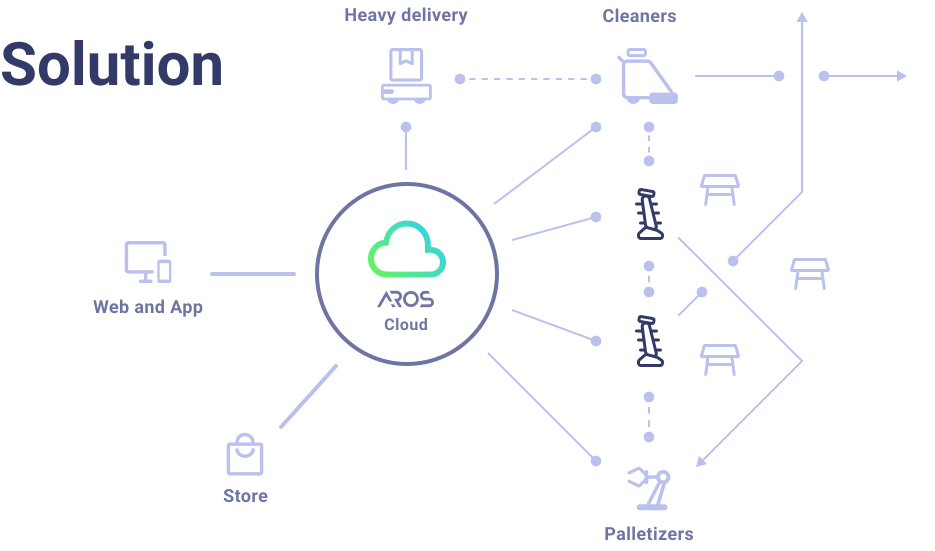
- The base applications made it impossible to integrate the robots into any mixed system of mechanisms, sensors, and other robots — that is, into a single ecosystem.






Interface screens of several default apps on the robot tablets
Our goal
Our goal was to design and deliver a new interface with a clear and intuitive UX, stable performance, proper localization, and the ability to scale functionality and integrate the robots under the control of a cloud-based platform.
I analyzed the full functionality of the existing applications used on our robots, as well as competing solutions, in order to incorporate best practices and proven approaches. The new interface was intended to fully expose the robot's rich functionality — which originally existed but was hidden behind an unintuitive UI and configuration workflows that relied on a separate PC — and to enable future integration of delivery robots into a unified ecosystem alongside sensors and other types of robots.
Latin dance classes In manhattan
Technical constraints
Beyond the UX problems, the project faced the following significant technical constraints:
The tablets installed on the robots had weak hardware (low RAM, a weak processor, and insufficient storage). This imposed constraints on design and animation — heavy animations, complex visual effects, and media-rich elements were not feasible.
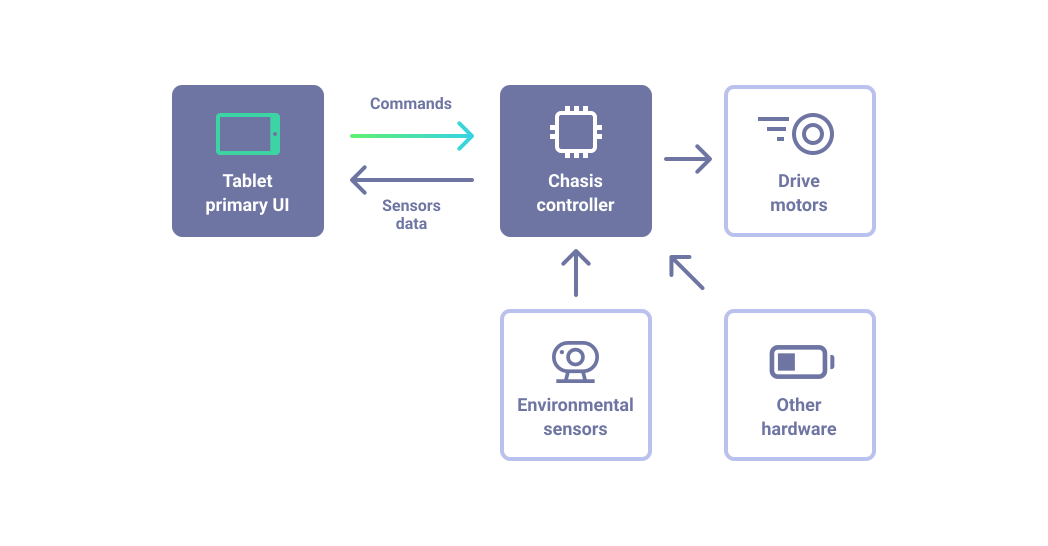
A key challenge was establishing reliable communication between our new application and the robot's chassis controller. The system architecture consisted of two separate logical components:
The tablet had to exchange data with the controller via an API — sending movement commands and receiving sensor data. However, documentation and technical support from the original hardware developers were limited and inconsistent: responses were often delayed or incomplete, which forced the team to rely on trial and error to achieve stable and correct integration with the hardware.
- the tablet — the robot's primary interface and "brain"; and
- an embedded controller within the chassis, responsible for drive motors, environmental sensors, and other physical hardware.
The tablet had to exchange data with the controller via an API — sending movement commands and receiving sensor data. However, documentation and technical support from the original hardware developers were limited and inconsistent: responses were often delayed or incomplete, which forced the team to rely on trial and error to achieve stable and correct integration with the hardware.
Effective interface testing was only possible on the robots themselves, in real-world conditions. During early MVP development the team had access to only two robots: one was constantly used by the developers, while the other was tied up in testing. This significantly slowed down the development and debugging cycle and required careful planning of test sessions. As the team manager, I arranged the schedule for access to the robots between development and testing to minimize downtime.
In addition, the robots themselves had known software and hardware issues (related to sensors, motors, and assembly quality), which occasionally caused unexpected failures. While these issues were not directly related to our interface, they affected the overall system behavior and had to be taken into account during testing.
In addition, the robots themselves had known software and hardware issues (related to sensors, motors, and assembly quality), which occasionally caused unexpected failures. While these issues were not directly related to our interface, they affected the overall system behavior and had to be taken into account during testing.
03.Research
I analyzed in detail all the interfaces preinstalled across the different robot models in order to identify their usability issues, strengths, and limitations. In parallel, I reviewed the cloud infrastructure used for robot deployment and configuration, which resulted in a consolidated map of the existing interface landscape. I also ran a competitive interface analysis.
The research showed that while the robots offered very broad functionality, the existing UI did not expose these capabilities clearly or coherently enough.
The research showed that while the robots offered very broad functionality, the existing UI did not expose these capabilities clearly or coherently enough.
04.Design process
Information architecture
Work on the interface began with building the application's logical structure. I created an MVP-level functional map of the robot and its interface sections, based on the collected features, management expectations, and hardware capabilities.
This map became the foundation for further task decomposition and for shaping the overall development plan, which I carried out together with the Android developers and QA, acting as the team manager.
This map became the foundation for further task decomposition and for shaping the overall development plan, which I carried out together with the Android developers and QA, acting as the team manager.
Design system
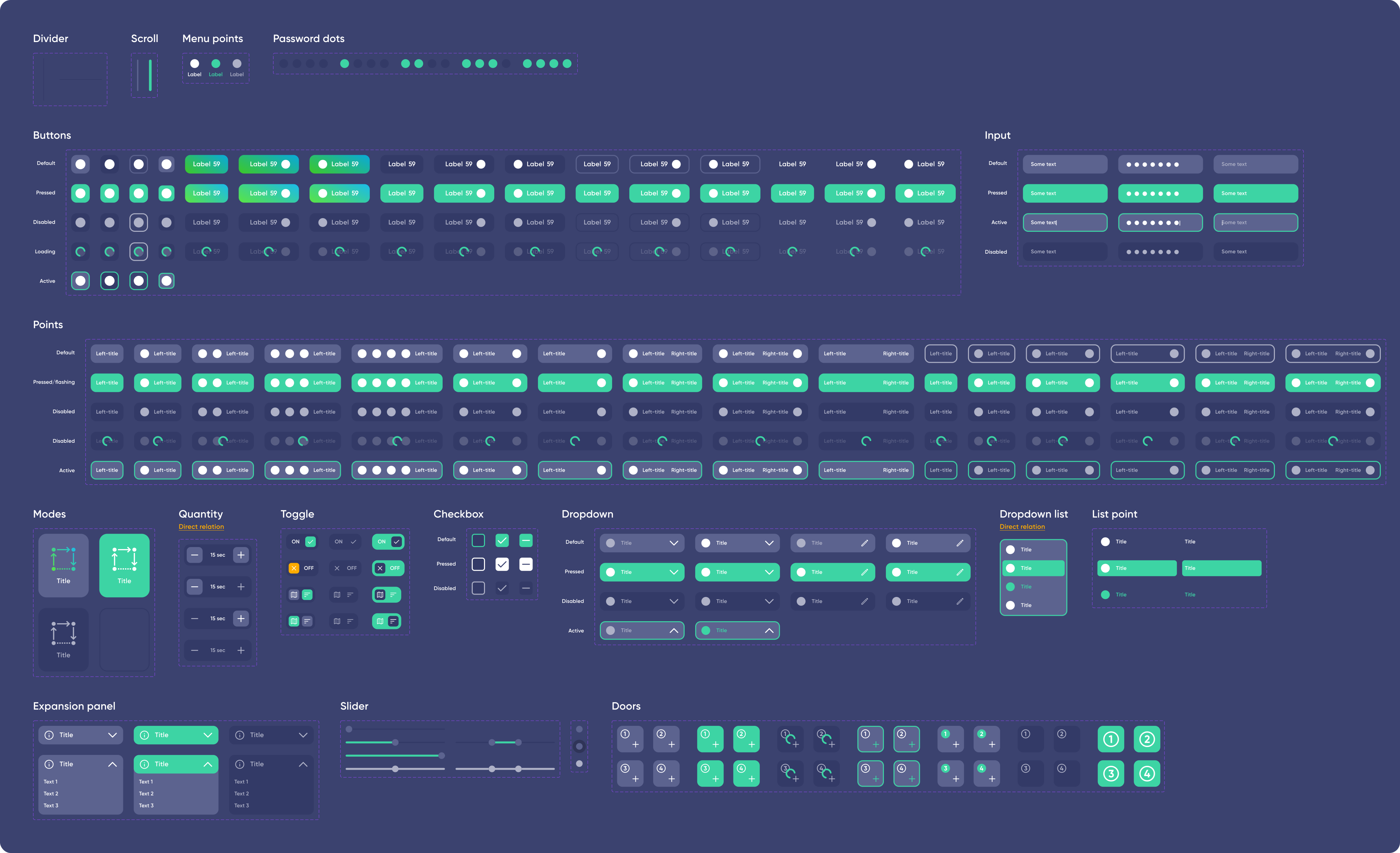
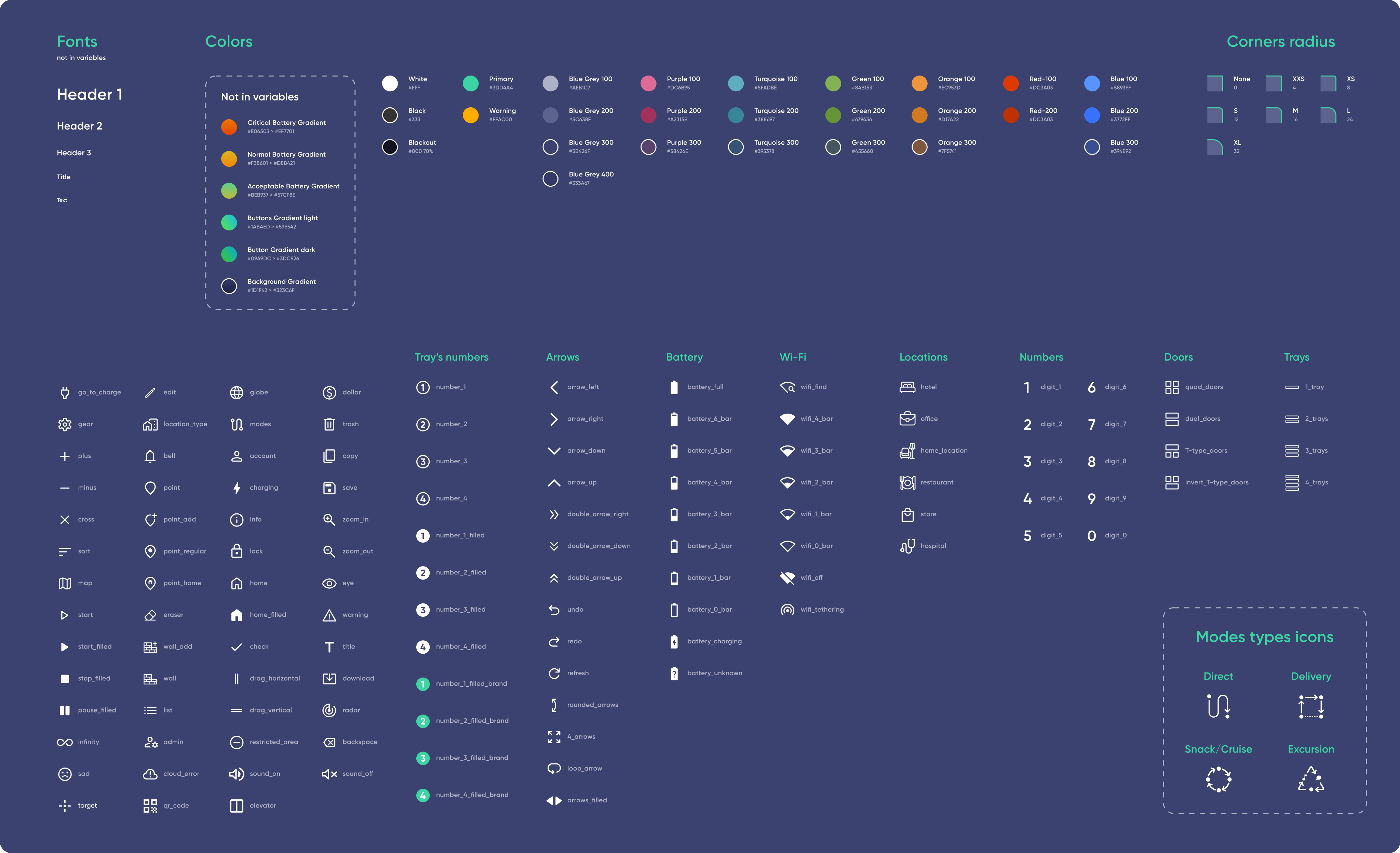
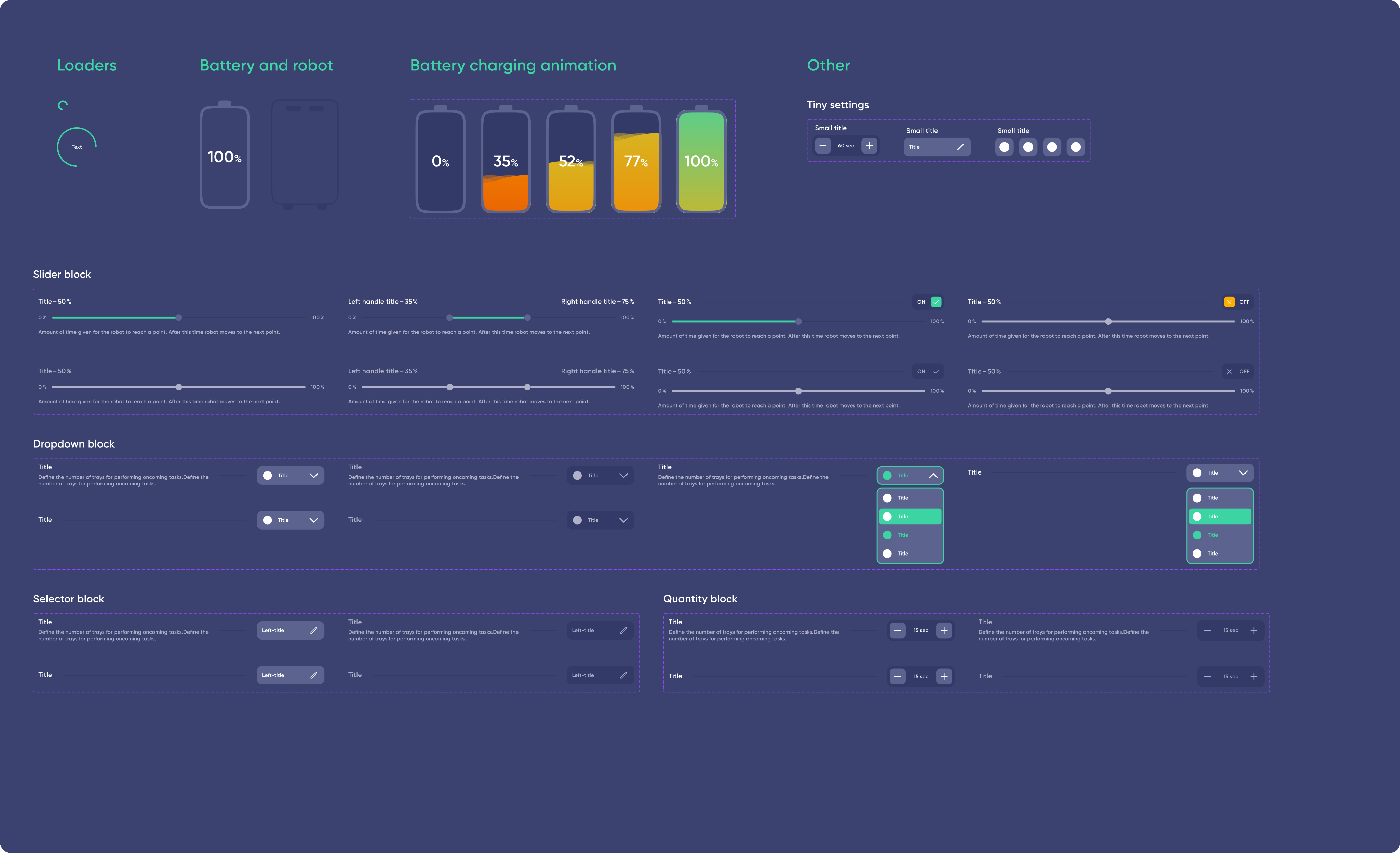
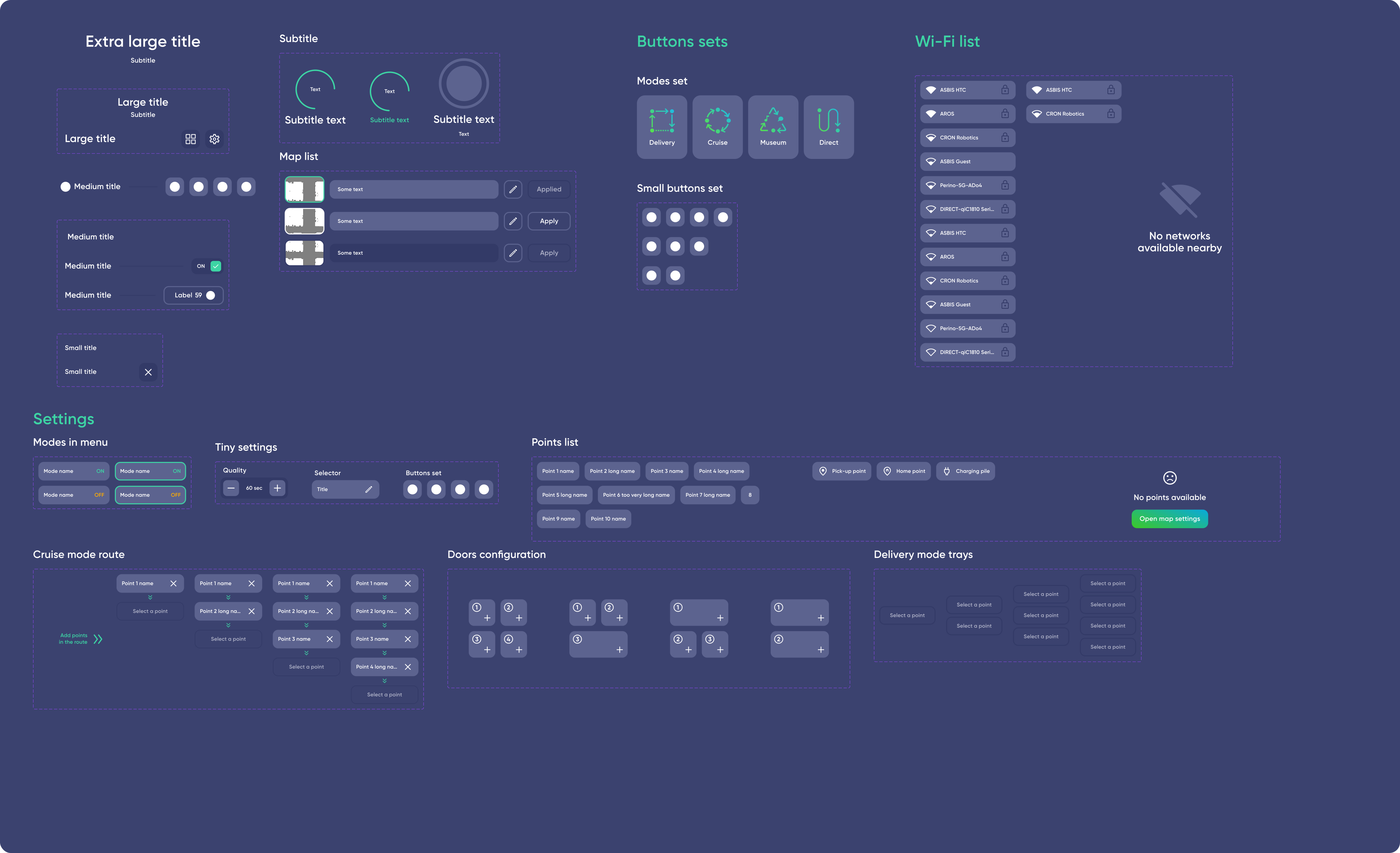
I also built a dedicated design system from scratch: scalable UI components for tablet screens, a palette tuned for indoor lighting, typography optimized for readability, and a full set of icons and interaction states. It kept the interface visually consistent and made shipping new features in later iterations much faster.
Its core principle was resilience to hardware differences: since robot models exposed different data and capabilities, every component was built to handle incomplete data — hiding or disabling what wasn't available without breaking the layout. That's what let one UI run across robots from different manufacturers, without a separate version for each.
Its core principle was resilience to hardware differences: since robot models exposed different data and capabilities, every component was built to handle incomplete data — hiding or disabling what wasn't available without breaking the layout. That's what let one UI run across robots from different manufacturers, without a separate version for each.
05.Development process
After the design stage, we implemented the MVP. To avoid problems with text clarity, layout, and localization, we involved technical writers early on. They prepared the UI copy and terminology with support for several languages, including English, which meant the interface was ready for localization from the very beginning.
The MVP offered only basic robot control functions, without fine-grained route configuration:
-
 Direct modeThe robot drives from its current position straight to a single destination point, selected either from the list or directly on the map.
 -
 Cruise modeAutonomous patrolling or movement along a predefined loop (the robot drives in a circle, for example to hand out snacks or to patrol an area).
 -
 Delivery modeThe robot follows a multi-checkpoint route to distribute cargo across different places (for example, packages around an office), then returns to its start.
 -
 Go to charge modeThe robot automatically returns to the dock station on the user's command or when predefined triggers fire (for example, a low battery level).
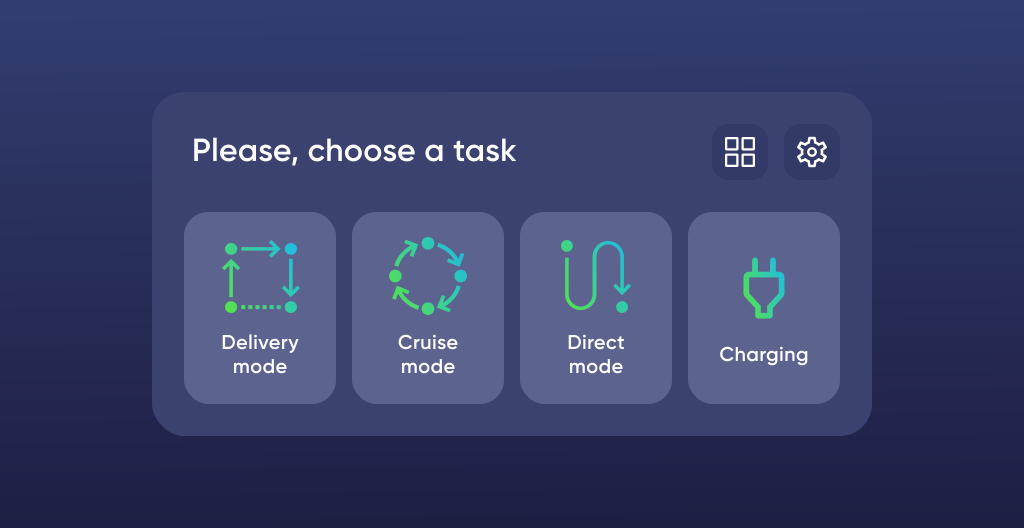
MVP Main menu
This approach allowed us to quickly start testing on real hardware, collect early feedback, and validate the reliability of the “tablet application — chassis controller” integration. The MVP helped the team identify key and subsequent integration issues at an early stage, while the overall functionality remained relatively simple.
Latin dance classes In manhattan
Iterations and improvements based on testing
We ran usability testing of the prototype with employees who were potential users of the robot. The very first sessions revealed a critical issue: the interface elements were too small for the tablet form factor, making it hard for adult operators to tap buttons accurately.
Based on this feedback, we enlarged the buttons, icons, and typography across the entire application, significantly improving readability and touch accuracy.
As testing progressed, we gradually introduced advanced movement and navigation settings beyond the MVP — such as elevator calling and on-device environment mapping, with waypoints placed directly on the generated map. This iterative approach let us improve the interface step by step without major regressions in system stability.
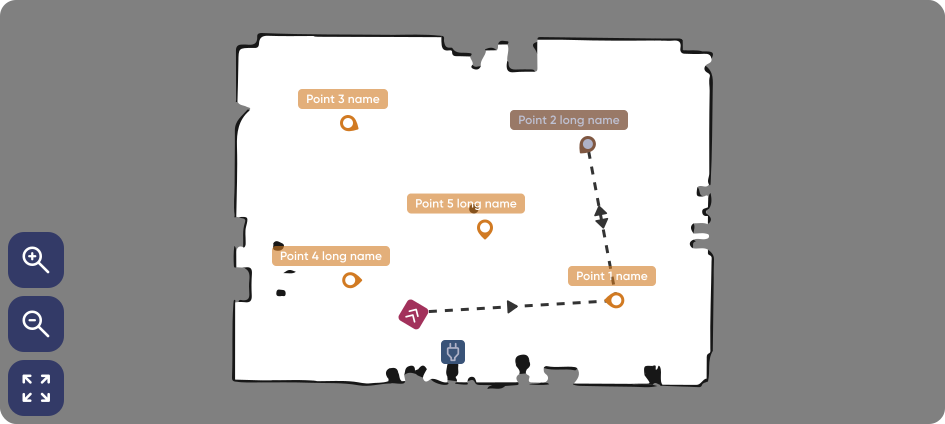
Robot-generated room map
Latin dance classes In manhattan
Mobile app for fleet management
In addition to the on-robot interface, a separate section of the mobile application was developed in collaboration with another internal team to enable remote monitoring and control of the robot fleet within a smart home system. I prepared the technical specification for porting the necessary functionality into this application, assigned tasks to the team, and designed the screens for interacting with our robot inside it.
Through this application, users could, for example, call a robot to a specific location or monitor battery levels and overall robot status. Thanks to this integration, the robot could also be activated by various triggers from the smart home and the system itself.
While the mobile application was not a core part of the project, it became a valuable complementary component of the overall system.
Through this application, users could, for example, call a robot to a specific location or monitor battery levels and overall robot status. Thanks to this integration, the robot could also be activated by various triggers from the smart home and the system itself.
While the mobile application was not a core part of the project, it became a valuable complementary component of the overall system.




Robot in the smart home app: device card with quick actions, device settings, scenario setup, and a fleet list with live statuses.
06.Final design



07.Results
Solution deployment
The solution was deployed in real-world conditions: the new interface was installed on robots operating at one of the company's European factories for internal logistics, as well as on delivery robots in office environments in Cyprus, Poland, and a few other locations. The project successfully progressed from prototype to industrial application.
Thanks to its adaptability, the interface ran reliably across robots from three different manufacturers — from compact shelf-based units to heavy-duty chassis with large displays — without requiring significant modifications.
Thanks to its adaptability, the interface ran reliably across robots from three different manufacturers — from compact shelf-based units to heavy-duty chassis with large displays — without requiring significant modifications.
User feedback
Users responded positively to the updated interface, highlighting clearer structure, larger control elements, and reduced onboarding time compared to the factory-provided version.
Some feedback related to hardware-level issues (navigation and sensors) rather than the UI itself. This feedback was shared with the hardware team, and most issues were later resolved. After several refinements, the interface proved stable and reliable in daily operations.
Some feedback related to hardware-level issues (navigation and sensors) rather than the UI itself. This feedback was shared with the hardware team, and most issues were later resolved. After several refinements, the interface proved stable and reliable in daily operations.
07.Conclusion
Latin dance classes In manhattan
Key takeaways
The interface noticeably simplified the operation of the delivery robots:
- Operators could launch the scenarios they needed without lengthy training and trust the robot with routine tasks like delivery and patrol.
- Staff workload dropped: manual transport was replaced by automation controlled through an intuitive tablet UI.
- The mobile app allowed the robot fleet to be managed remotely.
- The robots' behavior became configurable through triggers based on sensor data within the ecosystem.
Delivery robots with the new UI made indoor delivery faster and simpler. Quantitative metrics such as saved man-hours weren't tracked, but employee feedback makes it clear the robot became a reliable helper rather than a burden — and the project showed how thoughtful UI/UX unlocks the hardware's potential and lays a foundation for scaling and integration into the company's digital processes.
Impact on future projects
Designing Dev'n'Go taught me to account for hardware constraints from the very start, to structure a project, to synchronize a cross-functional team, and to design a UI not for an abstract screen but for interaction with real, moving physical objects.